Implementing CAN alongside DSHOT when FC limits force split channels

When configuring your flight platform, depending on the Flight Controller used, DSHOT outputs sometimes cannot be configured with sequential Servo Outputs within ArduPilot, especially when Bidirectional DSHOT is required.
This can create a challenge when integrating DroneCAN ESCs because CAN output mapping in ArduPilot defaults to sequential servo outputs.
Fortunately, with a few configuration adjustments on both ArduPilot and Hargrave ESCs, it’s possible to run Bidirectional DSHOT as the primary motor control while keeping DroneCAN as a secondary or backup.
Example Configuration Scenario
In this example, the aircraft uses:
- Bidirectional DSHOT as the primary motor control protocol
- DroneCAN as the backup/secondary control path
- Two Hargrave 4LPi 4-in-1 ESCs
Because of clock-speed requirements and bidirectional support, the available DSHOT outputs must be placed on:
- Main ports 1–4
- Aux ports 1–4
Within ArduPilot, these correspond to:
- Servo outputs 1–4
- Servo outputs 9–12
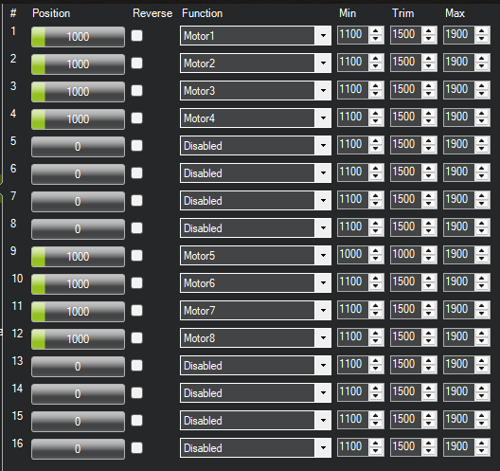
This creates a gap, skipping outputs 5–8, which is where the configuration adjustment becomes necessary.
NOTE: Splitting channels in this way increases overhead over CAN telemetry by approximately 30% so keep this in mind and make sure telemetry rates on devices are kept low to reduce the chance of issues over CAN. CAN should be used as the secondary or backup form of control due to this additional overhead.
Step 1: Configure ESC Indexing
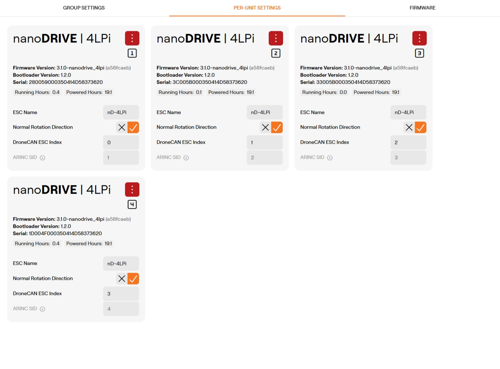
First ESC
- ESC indexes 0-3
- Corresponds to Servo outputs 1–4 (ESC index = servo output - 1)
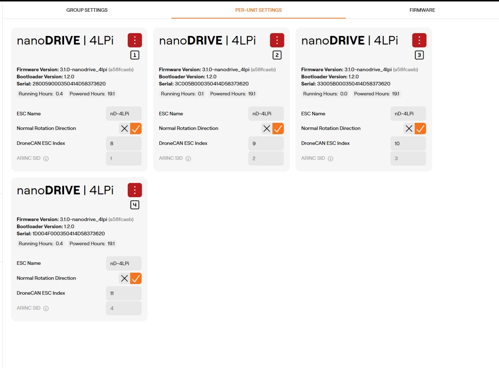
Second ESC
- ESC indexes 8–11
- Corresponds to Servo outputs 9–12 (ESC index = servo output - 1)
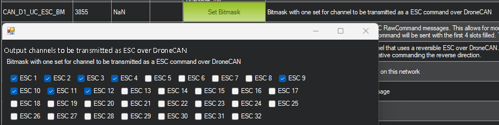
Step 2: Configure the CAN ESC Bitmask in ArduPilot
- Servo outputs 1–4
- Servo outputs 9–12
Why This Matters